Appearance
Pages (Part 3) — Dynamic pages
Module: Pages → dynamic page type Builds on: Pages (Part 1) (creating pages & the builder) and Pages (Part 2) (versions & languages). Who should read this: Administrators who build one page that renders many items from the Data Store — e.g. a single "post" page that displays any post by ID.
1. What a dynamic page is
A static page has fixed content. A dynamic page is a single template that displays a data item from the Data Store based on the URL — one "Posts" page can render post #1, post #2, and so on. Dynamic pages read from Data Categories / Data Schemas: the URL carries a value, the page looks up the matching data item, and the page's content, title, and metadata are filled from that item's fields.
Everything from Parts 1 and 2 still applies (versions, languages, lock/release, CSS/JS). This guide covers only what's different for a dynamic page:
- URL Parameters that bind the URL to a data category.
- Dynamic title & metadata bound to data fields.
- Dynamic element content & attributes in the builder.
- The
pageData.dynamicContentobject available to your scripts.
2. Creating a dynamic page
Create a page as usual, but set Page type = Dynamic. A warning appears:
"Dynamic pages must have at least one (Queryable) parameter."
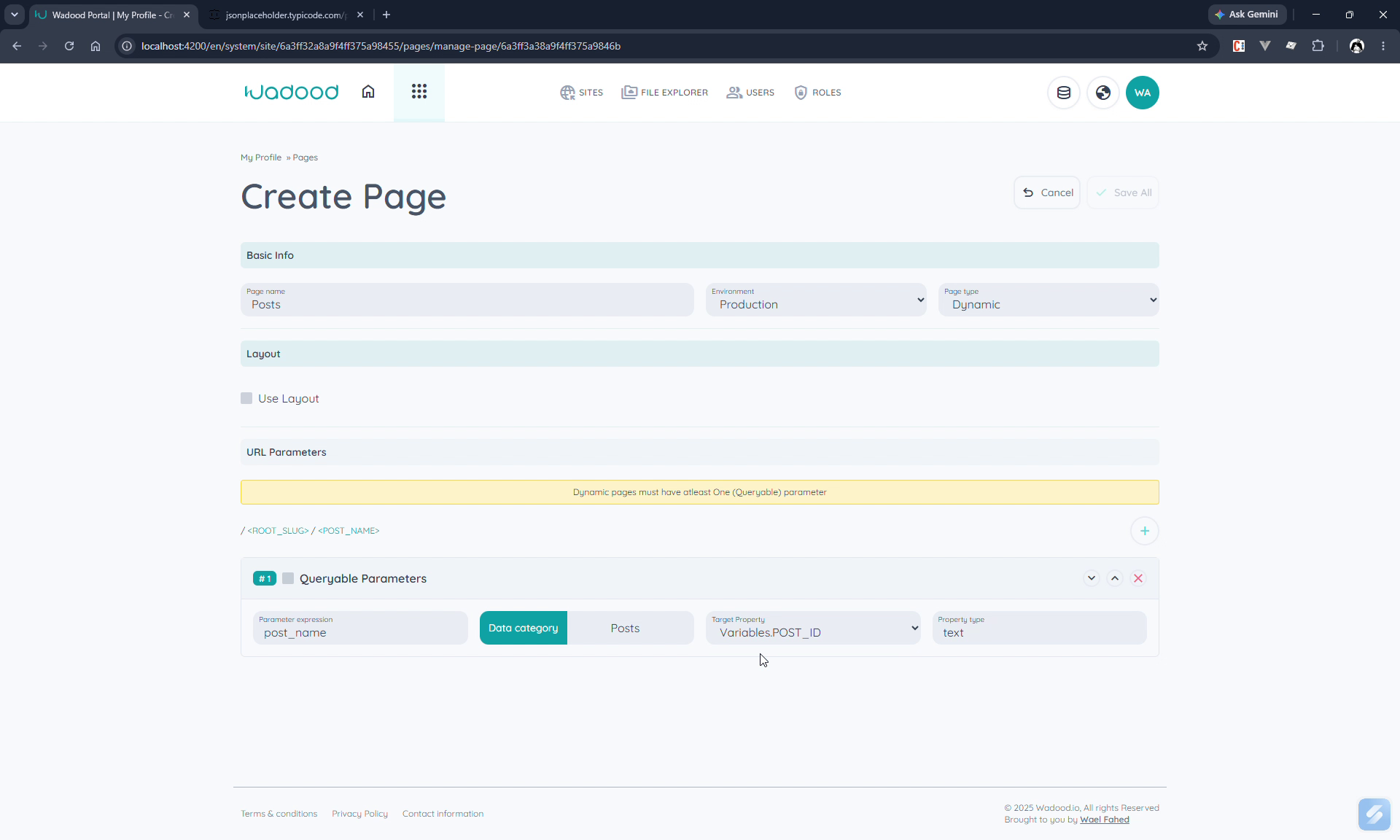
URL Parameters
A dynamic page's URL is /<lang>/<root-slug>/<param1>/<param2>…. Add parameters with +; each has:
| Field | Notes |
|---|---|
| Parameter expression | The segment's name (e.g. post_id). |
| Queryable | Tick to make this parameter look up data. At least one queryable parameter is required. |
| Data category | (Queryable only) the category to query — e.g. Posts (here an external category reading from JSONPlaceholder). |
| Target property | (Queryable only) the field whose value the URL segment matches — e.g. the post ID. |
| Property type | (Queryable only) read‑only; derived from the chosen field (e.g. text/number). |
So /en/posts/1 means "find the Posts item whose ID = 1". Parameters can be reordered (up/down) and removed.
A dynamic page can't be the site's default (home) page — it needs parameters to resolve an item, so the flag option is disabled for it.
3. Dynamic title tag
In the Page languages section, a dynamic page's title tag can be filled from the data item instead of typed. Per language, choose the Data category and Target property (an API field) to use as the title.
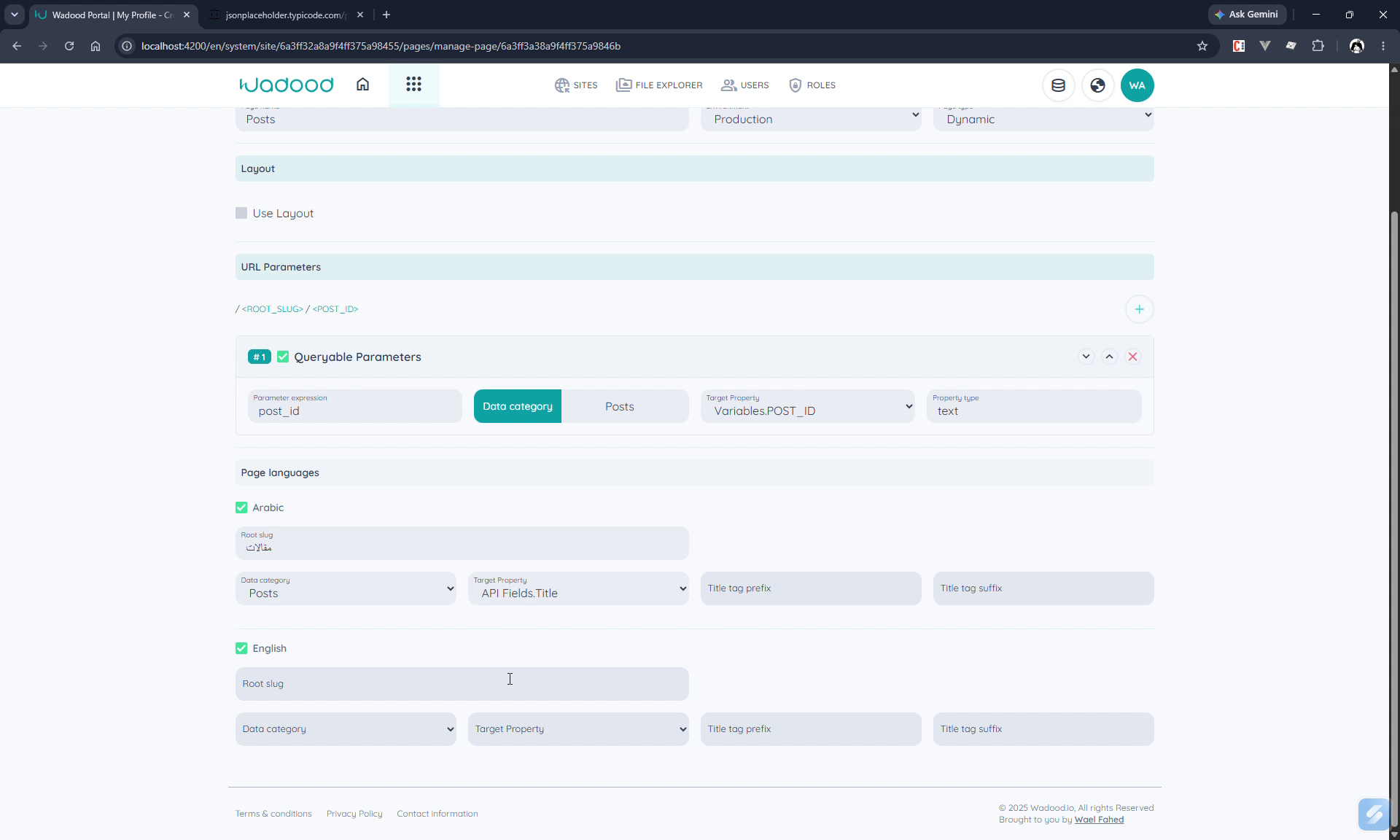
In the example, the Arabic root slug is مقالات and the English is posts, and both bind the title to the post's Title field (API Fields.Title). Optional prefix/suffix still apply. So each rendered post gets its own <title> from its data.
4. Dynamic metadata
The metadata editor gains a Value type per entry: Static or Dynamic.
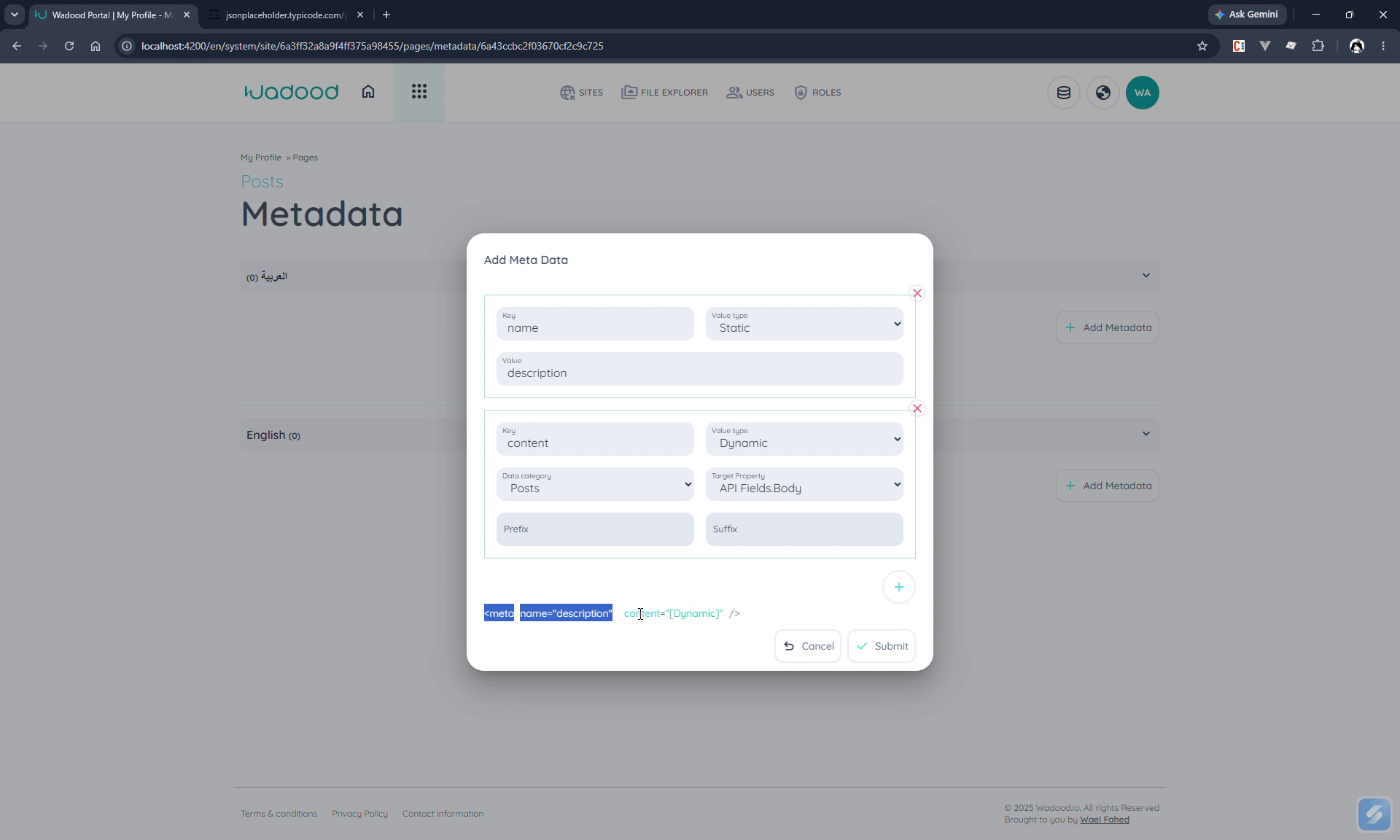
- Static — a fixed value (e.g.
name=description). - Dynamic — bind the value to a Data category + Target property (e.g. the post Body), with optional prefix/suffix. The live preview shows the value as a
${Dynamic}placeholder (e.g.<meta name="description" content="${Dynamic}" />).
This produces per‑item meta tags — great for SEO on item pages.
5. Dynamic content in the builder
In the page builder, the versions, languages, lock/release, CSS, and JavaScript all work exactly as for static pages. The difference is that elements can pull from the resolved data item.
5.1 Element inner text — Static vs. Dynamic content
When you add/edit an element on a dynamic page, the Basic Info tab shows a Static content / Dynamic content choice:
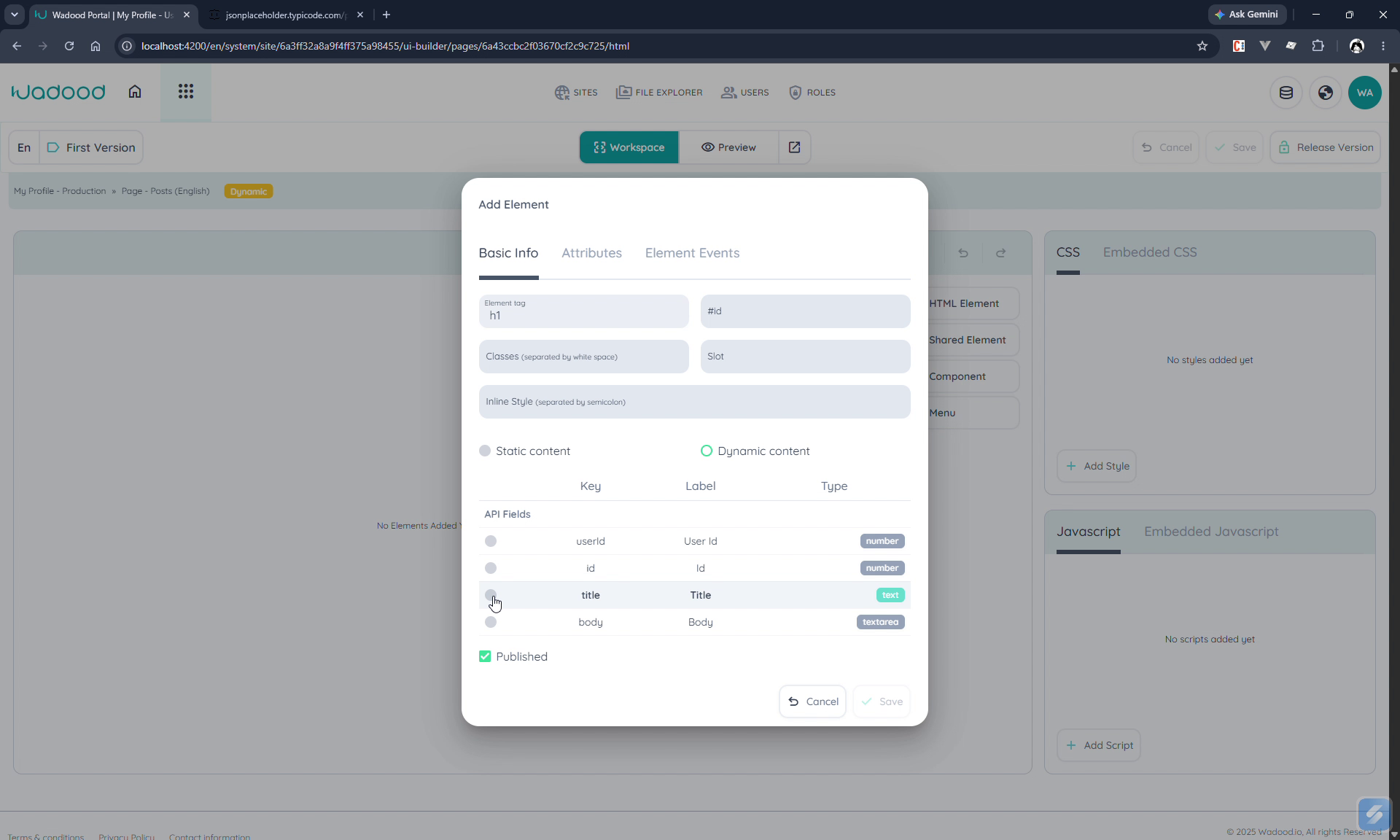
- Static content — type the inner text yourself.
- Dynamic content — pick one of the API Fields the page receives (shown as Key / Label / Type, e.g.
title(text),body(textarea)). The element renders that field's value for whichever item the URL resolved. (e.g. anh1bound to title, apbound to body.)
5.2 Attribute values — bind to data
On the Attributes tab of a dynamic page, each attribute row gets a magnifier button. Click it to bind the attribute's value to a data field; the value is stored as a token prefixed with $$ (e.g. $$title).
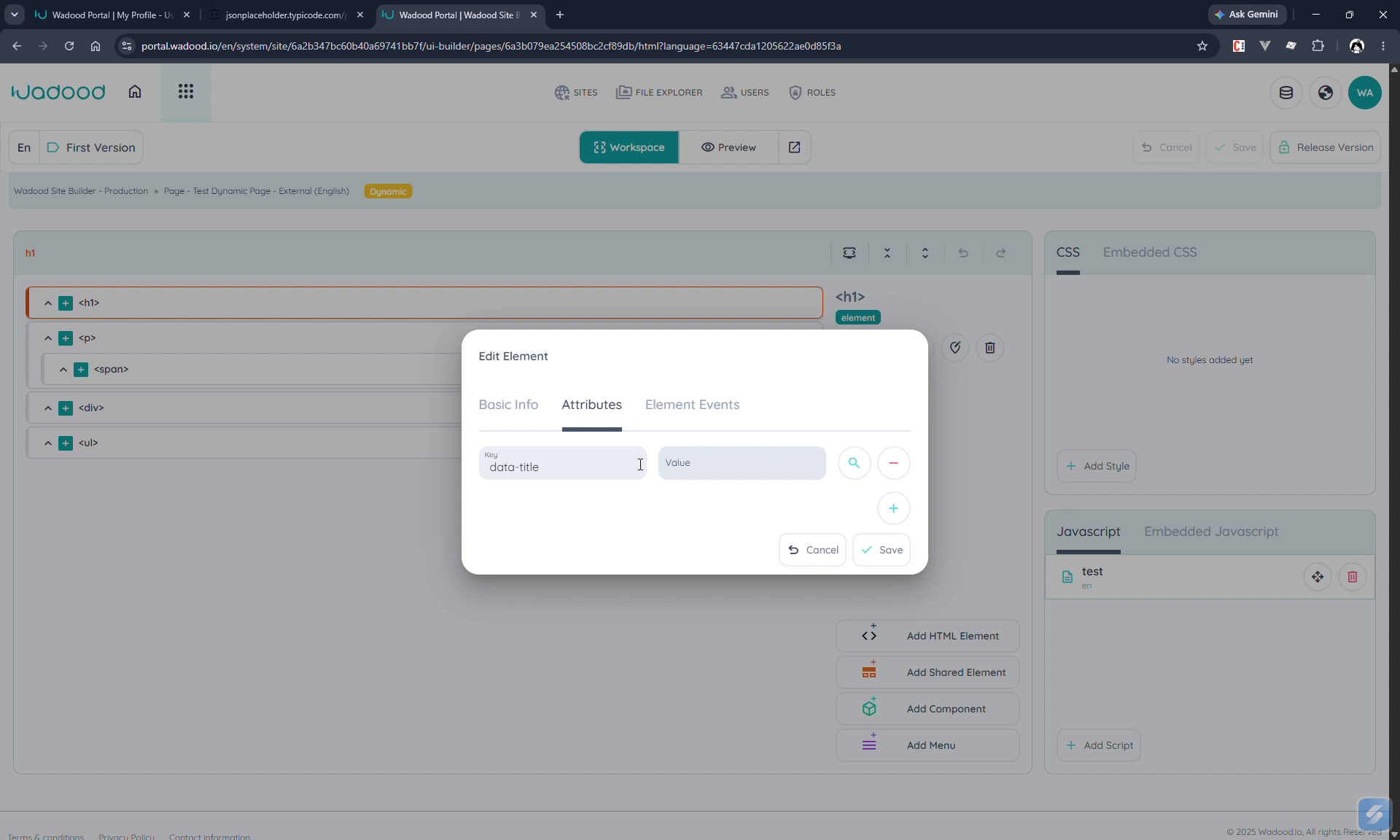
At render time on the live site, a
$$<field>token in an attribute is replaced with that field's value from the page's data.
5.3 Using the data in scripts — pageData.dynamicContent
The resolved data item is injected into the rendered page (in the document <head>) and exposed to your JavaScript as pageData.dynamicContent. Your page scripts can read it, e.g.:
js
const data = pageData.dynamicContent;
console.log(data.title, data.body);
// e.g. split the title into words and render a <ul>, etc.
The object changes with the URL parameter — /posts/1 and /posts/2 deliver different dynamicContent.
6. Previewing dynamic pages
A dynamic page only resolves once a real parameter value is supplied in the URL, so always test it with an actual value (and a couple of different ones) rather than the bare route:
- Open the page at
…/en/posts/1, then…/en/posts/2, and confirm the title, body, and metadata change to match each item.
This is the quickest way to confirm your parameter binding and your dynamic content/title/metadata are all wired to the right fields.
7. End‑to‑end example
A "Posts" dynamic page:
- Type: Dynamic. Parameter:
post_id, Queryable, Data category = Posts, Target property = ID. - Languages: en root slug
posts, ar root slugمقالات; title bound to the post Title. - Builder: an
h1with Dynamic content → title; ap→ body; optionally an attribute$$title; a script readingpageData.dynamicContent. - Visit
/en/posts/1→ the page renders post #1's title and body;/en/posts/2renders post #2.
8. Tips & common pitfalls
- At least one queryable parameter is mandatory — without it the page can't resolve an item.
- Target property is the match key (e.g. ID); make sure the URL value corresponds to it.
- Bind the right field for content/title/meta — the picker lists the data category's API fields with their types.
$$fieldin attributes andpageData.dynamicContentin scripts are the two hooks for custom dynamic behaviour.- Dynamic pages can't be the default page — and always test with a real parameter value in the URL (try a couple, e.g.
/1and/2) to confirm the content changes per item. - The data comes from the bound Data Store category/schema — that's where you manage the actual items and the external/API connection.